 MiddleGround
A message arrives
“The meeting-room light keeps switching off.”Message · Sender · Attachments
The original email stays with the request. A device, room or customer record can provide extra context.
Providers
A device has a status. A service has a request in progress. A local system knows something that matters to your work. A Provider is the connection that makes supported information from that system available in MiddleGround.
You choose which offered resources become Things. The provider can keep their current status up to date and expose supported actions, while MiddleGround connects them to rooms, projects, people and documents.
A connected service desk · Conceptual workflow
A customer reports an issue. A connected mail provider brings the message into the workflow, and an AI assistant helps turn it into a ticket someone can act on.
The original email stays with the request. A device, room or customer record can provide extra context.
The assistant can summarize the update, adjust the status and prepare the next response. Replies can be reviewed by a person or handled within agreed automation rules.
Email → Ticket → Action → Follow-up → Updated ticketAn illustrative workflow across connected mail, task and reporting tools. The provider connects the systems; the assistant does the organizing and drafting; MiddleGround keeps the record and relationships together.
Providers are under active development. The examples below bring together the work already taking shape and ideas for how this connection can grow.
Connects supported devices on a local network. After discovery and review, selected devices can become Things with current status and supported controls, such as switching or dimming. A light, sensor or switch gains a place alongside the room, installation and people it relates to.
A local hub brings device events, controls and automation together. Its optional provider connection publishes selected devices to MiddleGround. The hub handles local operation; MiddleGround adds shared context and connections around those devices.
A simulated apartment demonstrates how rooms, devices, changing status and supported actions can work together. It makes the connection between a physical space and its digital context tangible.
A small service-desk example connects a support ticket and its status through the same provider boundary. It shows that Providers can connect software resources as well as physical devices; the same idea can extend to requests, tasks and other records from external applications.
The same concept opens up other useful connections. Providers can be designed around the information that arrives in your work, giving an assistant something concrete to pick up.
An Inbound Submission Provider could bring a contact form, quote enquiry or service request into the relevant workspace. An assistant could turn the incoming details into a project brief, extract requirements and prepare follow-up questions, keeping the original request with the work.
Imagine a document provider bringing an invoice, inspection report or manual into the right project. The assistant could extract key details, summarize what changed and update a checklist, while MiddleGround retains the source and the result together.
An order changing status, a delivery arriving or a task being completed could become input for the same shared context. An assistant could use those updates to prepare a progress summary or suggest what needs attention next.
Providers connect systems. AI assistants help you work with the information available to them. MiddleGround keeps the Things, shared context, documents and saved results connected between those two kinds of interaction.
For example, an assistant can use the maintenance notes and documents shared with it to prepare a summary, extract open issues or draft a report. Provider status can add operational context where the integration exposes it. The assistant prepares the content; MiddleGround keeps the result with the project, and a reusable template guides its content, form and appearance in the chosen output.
The distinction: A Provider connects an external resource. An Integration configures that connection for an Environment. A Template describes how its resources fit into MiddleGround. An AI connection lets an assistant work with supported information and actions within its access.
03 / Spaces & devices
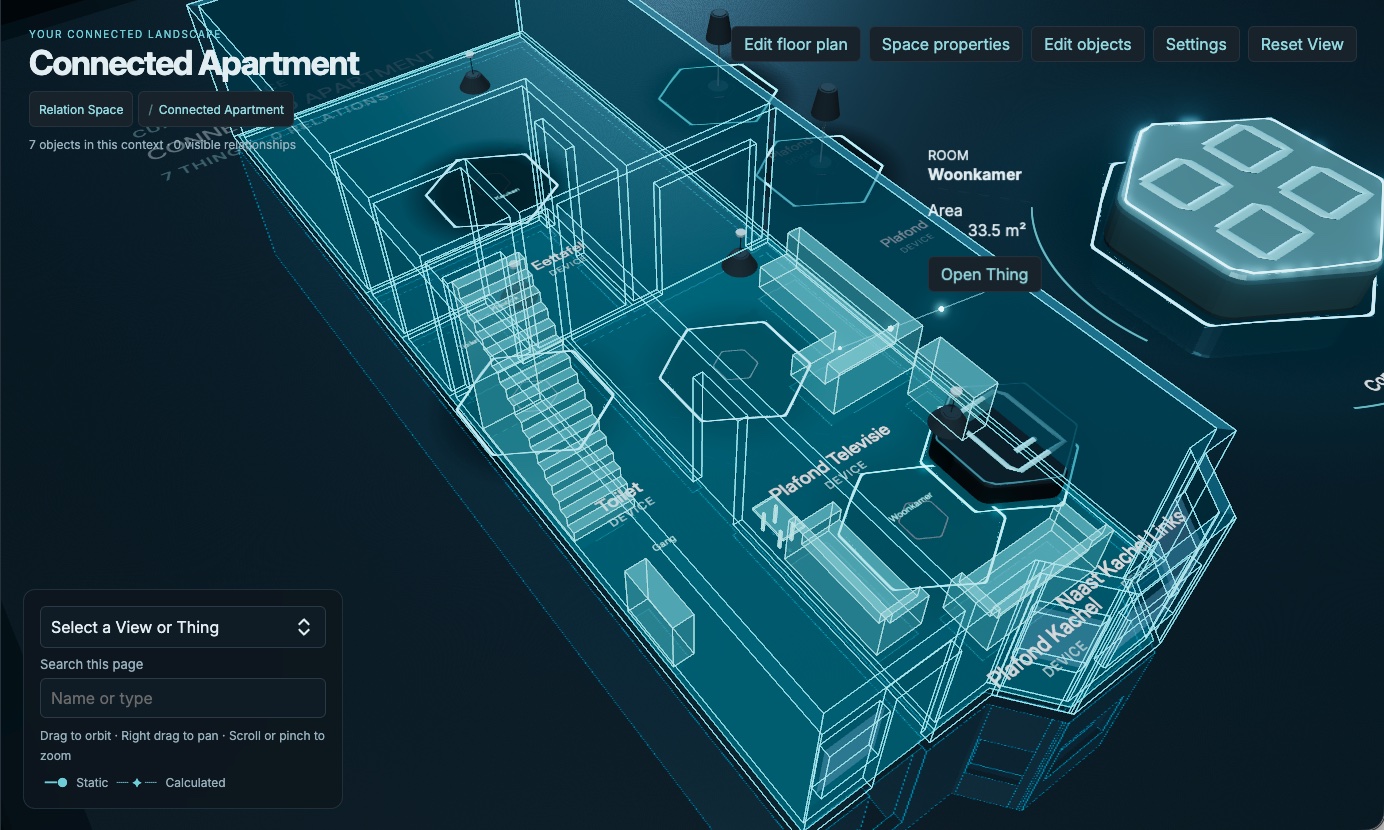
Rooms and devices can be Things too. A separate IoT environment places them in a spatial view of a connected apartment.
Connected Apartment · IoT example
Place information in a physical setting
A floor plan can give a View in Relation Space a familiar physical setting. In the web app, choose the metric floor-plan space type and open Edit floor plan.
Draw rooms, wall paths and named areas. Add doors, windows and passages, then adjust dimensions in metres.
Switch from the 2D editor to the 3D model to explore the walls and openings. Return to the editor to refine the layout.
The plan belongs to that View. Use it as spatial context alongside your Things and connected devices; creating a model does not connect hardware by itself.
The floor-plan editor is available on web. Multiple storeys and automatic assignment of Things to areas are not included. This is a contextual model, not a replacement for architectural design software.
We measure tab sessions, pages, visible time and approximate city/country for 90 days. No cookies or stored IP addresses. Temporary session storage expires after 30 minutes of inactivity or four hours. Do Not Track and Global Privacy Control disable measurement.